
Product: PowerSyncPro | Windows BitLocker | Active Directory
Applies To: AD-to-AD Migrations | Hybrid Joined Devices
Severity: Medium
Symptom
During or after a PowerSyncPro AD-to-AD migration, the following error is encountered when attempting to escrow the BitLocker recovery key to Active Directory:
Could not back up recovery information to Active Directory, error code 0x1Or when running PowerShell manually:
Backup-BitLockerKeyProtector : Group policy does not permit the storage of recovery information to Active Directory. The operation was not attempted.
Cause
Error code 0x1 is a generic operation failure. In the context of BitLocker AD escrow, it indicates that Active Directory rejected or could not process the recovery key backup request. This is most commonly caused by one or more of the following:
1. Missing or misconfigured Group Policy
The most common cause. The GPO settings required to permit BitLocker escrow to AD are either not configured, not linked to the correct OU, or have not yet applied to the migrated machine.
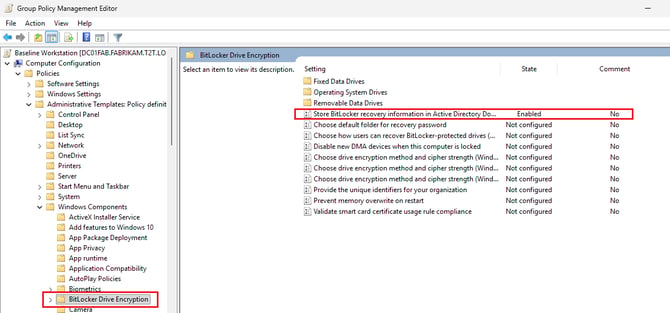
The two required GPO settings are:
| GPO Path | Setting |
|---|---|
BitLocker Drive Encryption → Operating System Drives |
Choose how BitLocker-protected operating system drives can be recovered |
BitLocker Drive Encryption → Fixed Data Drives |
Choose how BitLocker-protected fixed data drives can be recovered |
Both must be Enabled with the following options:
- Save BitLocker recovery information to AD DS
- Backup recovery passwords and key packages
- Do not enable BitLocker until recovery information is stored in AD DS
2. Computer account not yet established in target AD
The machine object does not exist in the target domain at the time the escrow is attempted, or AD replication has not yet completed across domain controllers.
3. GPO not yet applied on migrated machine
The machine has joined the target domain but Group Policy has not refreshed, meaning the BitLocker escrow policy is not yet active.
4. Machine authenticating to wrong domain controller
The migrated machine is still communicating with a DC from the source domain rather than the target domain.
Resolution
Step 1 — Verify GPO settings are configured correctly
On a DC or management machine, open gpmc.msc and confirm both GPO settings listed above are Enabled in the GPO linked to the OU containing migrated computers.
Step 2 — Confirm the GPO is linked to the correct OU
Verify the GPO is linked to the OU where the migrated computer account resides:
powershellgpresult /rConfirm the correct GPO appears under Applied Group Policy Objects in the Computer Settings section.
Step 3 — Force Group Policy refresh on the migrated machine
powershellgpupdate /forceStep 4 — Retry the BitLocker escrow
powershell$KeyProtectorId = (Get-BitLockerVolume -MountPoint "C:").KeyProtector | Where-Object {$_.KeyProtectorType -eq "RecoveryPassword"} | Select-Object -ExpandProperty KeyProtectorId Backup-BitLockerKeyProtector -MountPoint "C:" -KeyProtectorId $KeyProtectorIdStep 5 — Verify the key landed in AD
powershellGet-ADObject -Filter {objectclass -eq 'msFVE-RecoveryInformation'} ` -SearchBase "CN=COMPUTERNAME,OU=YourOU,DC=domain,DC=local" ` -Properties msFVE-RecoveryPassword | Select-Object Name, msFVE-RecoveryPasswordAlternatively, verify in Active Directory Users and Computers → Computer Object → Properties → BitLocker Recovery tab.
Prevention
Ensure the following prerequisites are met before PowerSyncPro attempts BitLocker re-enablement post-migration:
- Computer account exists in target AD OU
- AD replication has completed to all DCs
- BitLocker GPO is linked to the target OU
gpupdate /forcehas completed successfully on the migrated machine
Use the PowerSyncPro post-migration script RetryBitLockerEscrow.ps1 to automate escrow with built-in error handling across all encrypted volumes.
Related Articles
- BitLocker Escrow Failure: Could not back up recovery information to Cloud Domain (0x801C0450)