
Why is the account BPRT set as the OWNER of the newly migrated Workstation in Entra?
.
Update Feb 2026
We have seen more recently that for Entra Joined devices when you try to enrol in InTune they are successfully updating the owner of the workstation with the logged in user if licensed. However, Microsoft documentation is not reflective of this yet.
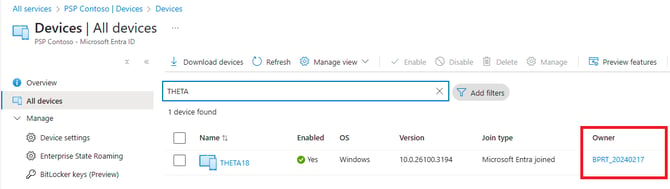
That is because it is the "Actual user" that Entra Joined the device is using using the Bulk Enrollment Token that is configured on Directories and is used in your Runbook.

Because we can never know for sure the who the "real owner" of a device is we do not orchestrate changing that.
Intune
When it becomes Intune Enrolled it will show the actual user and that will be in the Intune Portal.
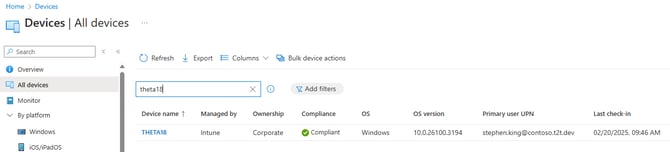
Change the Owner in Entra
You can change the owner in Entra using the New-MgDeviceRegisteredOwnerByRef graph cmdlet.
Connect to Graph
Connect-MgGraph -Scopes "Device.ReadWrite.All","User.Read.all","Directory.AccessAsUser.All"
Find the device
Make sure you only return one device.
Get-MgDevice -Filter "startswith(displayName,'your device name') and TrustType eq 'AzureAD'"
Add this device to a variable, and collect the current owner from the device
$device = Get-MgDevice -Filter "startswith(displayName,'your device name') and TrustType eq 'AzureAD'"

$CurrentOwner = Get-MgDeviceRegisteredOwner -DeviceId $device.id
Remove the current owner from the device
Remove-MgDeviceRegisteredOwnerByRef -DeviceId $device.id -DirectoryObjectId $CurrentOwner.id
Add the real Owner
Find the desired new owner
Get-MgUser -UserId <the users UPN>
Now register the user on the device
$NewOwner=Get-MgUser -UserId <the users UPN>

New-MgDeviceRegisteredOwnerByRef -DeviceId $device.id -OdataId "https://graph.microsoft.com/v1.0/directoryObjects/$($NewOwner.id)"
Now you can see that the Owner is set correctly.
