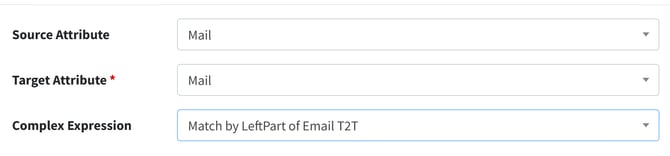
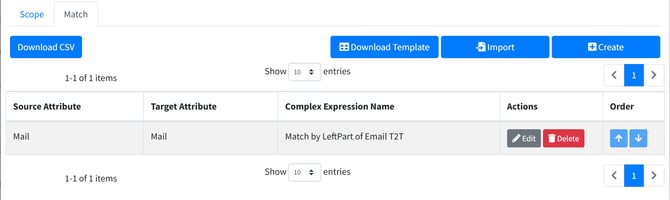
There could be a situation pre-cutover of a tenant where you will be taking over the domains, but you need to match the users in advance. The users may have been created in the target with the *.onmicrosoft.com value as the right part. So you could have a user like:
SOURCE
DisplayName: Conrad Murray
mail: conrad.murray@tailspintoys.com
UserPrincipalName: conrad.murray@tailspintoys.com
TARGET
DisplayName: Conrad Murray
mail: conrad.murray@pspcontoso.onmicrosoft.com
UserPrincipalName: conrad.murray@pspcontoso.onmicrosoft.com
We will take over the domain name tailspintoys.com during the cutover, but for now we need these two users to match so we can create a translation table for the Workstation Migration Agent.
We can create a DirSync profile that matches user based on the left part of the mail attribute. We need to create a Complex Expression first like this:
IF Mail is not null, THEN mail.Split('@')[0] + “targetdomain.com”
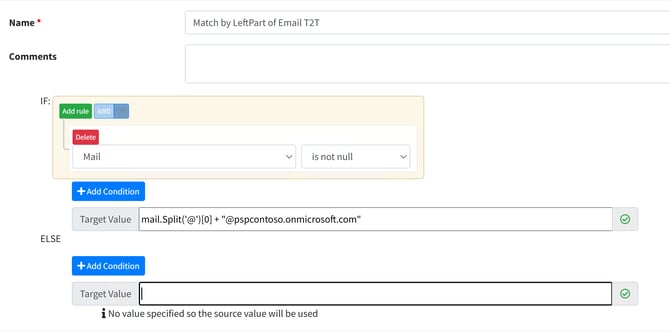
So this equates to reading in conrad.murray@tailspintoys.com as:
mail.Split('@')[0] = conrad.murray + “@pspcontoso.onmicrosoft.com”
and looking for a match in the target tenant on that value.
In your Sync Profile do this: