
Server Sizing
The recommended size for the PowerSyncPro Server depends on the number of Migration Agents reporting to it, as well as the number of objects being synchronised.
Up to 1,000 Agents and 100,000 Objects
- 2 vCPU
- 16 GB RAM
- Additional 100 GB data drive
- SQL Express can be used
Over 1,000 Agents and 100,000 objects
- 4 vCPU
- 32 GB RAM
- Additional 250 GB data drive
- Full SQL version is needed
SQL Server Memory Configuration
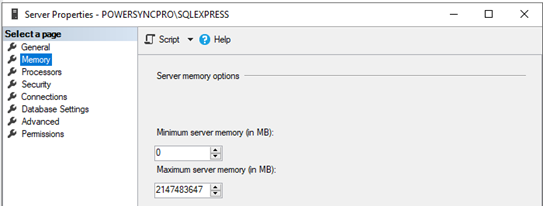
Unless otherwise configured, SQL will consume all available memory on the machine. We would recommend setting this to half the allocated physical memory of the server.
This particular server (VM) has 16 GB RAM allocated.
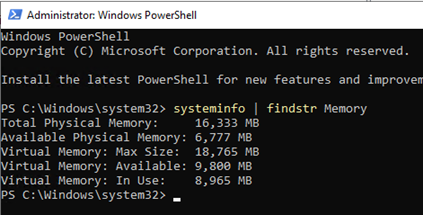
Default SQL Server Memory options
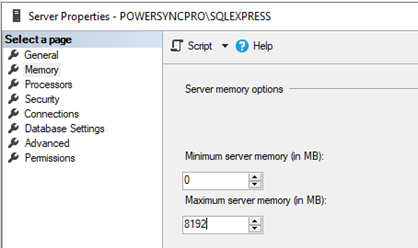
We recommend setting half the physical RAM of this VM. In this case set to 8 GB (8.192 MB)
Recovery model
From the PowerSyncProDB properties\Options we generally advise setting the Recovery model logging to Simple. This will reduce the chances of SQL consuming too much disk space on the server.
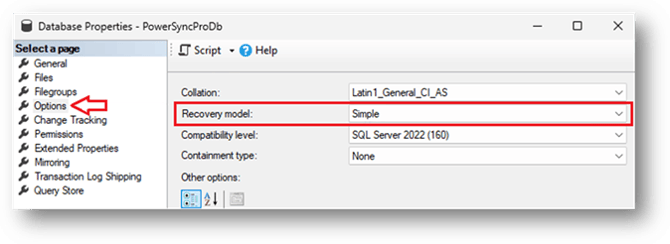
In SQL Server, the Recovery model of a database determines how transactions are logged, whether the log is truncated automatically, and how a database can be restored.
Choosing the Right Recovery Model:
- Simple: Use when data loss is acceptable, and you want minimal log maintenance.
- Full: Use when data integrity is crucial, and you need point-in-time recovery.
- Bulk-Logged: Use when bulk operations are frequent, and you can afford some data loss during those operations.